


Frontend Development with Figma With Grras

Master the future of digital product design and development with our comprehensive Frontend Development with Figma Internship. Gain in-depth expertise in Figma Design Systems, Component-Based Architecture, Responsive Layouts, and Modern CSS Methodologies. Learn industry-standard tools including Figma, HTML5, Tailwind CSS, and JavaScript to build pixel-perfect, high-performance user interfaces from concept to code.

https://grras.com/wp-content/uploads/2025/10/15.png
19K+ Classes Completed
https://grras.com/wp-content/uploads/2025/10/97.png
95% Satisfaction Rate
https://grras.com/wp-content/uploads/2025/10/102.png
120K+ Students Community

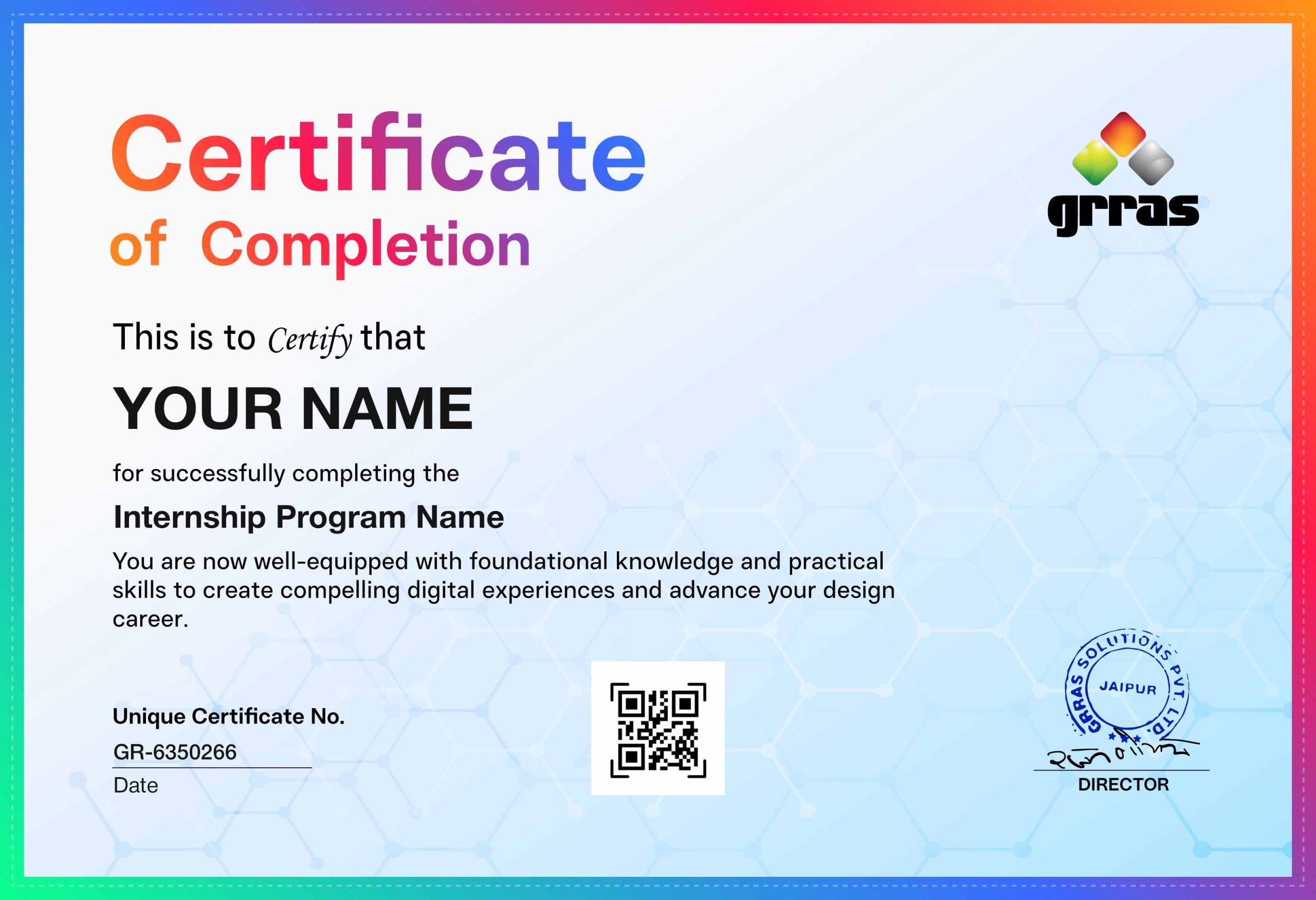
Earn an ISO-Certified Training Certificate

Upon successful completion of the Frontend Web Development Internship, learners will be awarded an industry-recognized certificate from GRRAS Solutions Pvt. Ltd.

During this program, participants gain hands-on experience in HTML, CSS, JavaScript, Tailwind CSS, and Bootstrap, along with modern UI development practices. Learners build responsive and interactive websites, work with real-world projects, and understand version control using Git and GitHub, as well as deployment techniques.

This certificate validates practical knowledge, project development experience, and frontend development skills, making it a valuable addition to your resume and career profile.

The certification comes with lifetime validity and is LinkedIn shareable, allowing learners to showcase their achievements professionally. It is a verifiable certificate with a unique credential ID, ensuring authenticity and recognition by recruiters and organizations. Additionally, it serves as proof of hands-on project experience and industry-relevant skills, helping learners stand out in job opportunities.

Apply for Internship

Course Structure Overview

The Frontend Web Development Internship is designed to help learners build modern, responsive, and interactive websites using HTML, CSS, JavaScript, and industry-relevant frameworks like Tailwind CSS and Bootstrap.

This program begins with the fundamentals of web development, enabling learners to structure web pages using HTML and design visually appealing interfaces with CSS. As the course progresses, students learn advanced layout techniques such as Flexbox and Grid, along with responsive design principles to create websites that work seamlessly across all devices.

The internship also focuses on JavaScript, where learners develop the ability to create dynamic and interactive web applications by working with the DOM, handling events, and integrating real-world features using APIs. Advanced JavaScript concepts like promises, async/await, and modern development practices are also covered.

Additionally, learners gain hands-on experience with Git and GitHub for version control and collaboration, along with deployment techniques to make their projects live on platforms like Netlify and GitHub Pages.

With a strong emphasis on practical learning and real-world projects, this internship equips learners with the skills and confidence required to start their journey as frontend developers and build industry-ready web applications.

Course Highlights

  • Foundation in HTML, CSS, JS basic to advanced concepts
  • Tailwind CSS and Bootstrap framework
  • Figma With AI And Project Deployment
  • 8+ Practice Projects for real-world web applications
  • Focus On problem solving and logical thinking
  • Prepares student for advanced programming

Detailed Curriculum

Module 01 - HTML

  • Introduction to HTML
  •  Structure of an HTML Document
  •  Empty and Container Tags
  •  Semantic HTML Tags
  •  HTML Elements and Attributes
  •  Headings and Paragraphs
  •  HTML Lists (Ordered and Unordered)
  •  HTML Tables
  •  Forms and Important Input Types
  •  Labels and Form Validation Basics
  •  Media Elements (Audio, Video)
  •  Images and Image Attributes
  •  Links and Navigation
  •  Meta Tags
  •  SEO Basics

Module 02 - CSS

  • Introduction to CSS
  • Inline, Internal and External CSS
  •  CSS Selectors
  •  CSS Specificity
  •  CSS Box Model
  •  Margin and Padding
  •  CSS Colors and Backgrounds
  •  CSS Typography
  •  Flexbox Layout
  •  Grid Layout Basics
  •  Positioning (Static, Relative, Absolute, Fixed, Sticky)
  •  Pseudo Classes
  •  Pseudo Elements
  • Transitions and Animations
  •  Responsive Design Basics
  •  Media Queries

Module 03 - Tailwind CSS

  • Introduction to Tailwind CSS
  • Utility First CSS Concept
  • Installing Tailwind CSS
  • Tailwind Project Setup
  • Tailwind Layout Utilities
  • Spacing (Margin & Padding)
  • Typography Utilities
  • Colors and Backgrounds
  • Flexbox with Tailwind
  • Grid Layout with Tailwind
  • Responsive Design with Tailwind
  • Hover, Focus and State Variants
  • Building Responsive UI with Tailwind
  • Creating Cards and Layouts with Tailwind

Module 04 - Bootstrap Framework

  • Introduction to Bootstrap
    • Bootstrap Grid System
    • Bootstrap Typography
    • Buttons and Button Groups
    • Alerts and Badges
    • Cards
    • Modals
    • Tooltip and Popover
    • Dropdowns
    • Collapse
    • Navbar
    • Forms and Form Inputs
    • List Groups
    • Pagination
    • Progress Bars
    • Carousel
    • Tabs and Pills
    • Responsive Design with Bootstrap

Module 05 - JavaScript Basics

  • Introduction to JavaScript
  • Variables
  •  Operators
  •  Arithmetic Operations
  •  Assignment Operators
  •  Data Types
  •  Strings
  • Numbers
  • Booleans
  • Arrays
  •  Objects
  •  Functions
  •  Events
  •  DOM Introduction
  •  DOM Selectors
  •  DOM Manipulation
  •  Event Handling

Module 06 - JavaScript Core Concepts

  • Control Statements (if, else, switch)
  • Loops (for, while, do while)
  •  Array Methods
  •  String Methods
  • Date Method
  •  Math Methods
  •  Random Functions
  • Type Conversion
  •  JSON Basics
  • Error Handling
  • Scope
  • Strict Mode
  • this Keyword
  •  let and const
  • Debugging JavaScript

Module 07 - Advanced JavaScript

  • Closures
  • Type Coercion
  • Constructor Functions
  •  Callbacks
  •  Callback Hell
  • Call Stack
  • Call Queue
  •  Event Loop
  •  Task Queue and Microtask Queue
  •  Hoisting
  • IIFE (Immediately Invoked Function Expression)
  • Prototype and Prototype Methods
  • Promises
  • Async / Await
  • Fetch API
  •  Working with APIs

Module 08 - Git and Version Control

  • Introduction to Version Control Systems
  • What is Git
  •  Why Git is Used in Development
  • Installing Git
  • Git Basics
    • Git Repository
    • Git Init
    • Git Clone
    •  Git Status
    • Git Add
    • Git Commit
  • Working with GitHub
    • Introduction to GitHub
    • Creating a GitHub Repository
    •  Connecting Local Project to GitHub
    •  Git Push
    •  Git Pull
  • Branching
    • Git Branch
    • Creating Branches
    •  Switching Branches
    •  Git Merge
    •  Resolving Merge Conflicts
  • Collaboration
    • Forking Repositories
    • Pull Requests
    •  Code Review Workflow
    • .gitignore File

Module 09 - Deployment Basics

  • Preparing Website for Deployment
  • GitHub Repository Setup
  •  Deploying Static Websites
  •  Hosting on Netlify / Vercel / GitHub Pages
  •  Testing the Website

Module 10 - AI Tools For Developers

  • 10.1 Introduction to Ai-Assisted Development
    • What is AI-assisted coding and why it matters
    • How AI tools fit into the developer workflow
    • Overview of tools: ChatGPT, Claude, GitHub Copilot, Cursor, v0 by Vercel
    • Responsible use of AI — understanding output, not blindly copying
    • When to use AI vs when to think independently
  • 10.2 Prompt Engineering for Developers
    • Core Prompting Concept
      1. What is a prompt and how AI models process it
      2. Role prompting — ‘Act as a senior frontend developer…’
      3. Zero-shot vs few-shot prompting
      4. Chain-of-thought prompting for complex problems
      5. Giving context: providing code snippets, error messages, file structure
    •  Prompting For Code
      1. Asking AI to generate HTML/CSS components from a description
      2. Asking AI to explain code line by line
      3. Asking AI to refactor or improve existing code
      4. Asking AI to fix bugs — how to share error context
      5. Prompting for Tailwind CSS utility classes
      6. Getting AI to write JavaScript functions with specific behavior
    • Prompting Best Practices
      1. Be specific: bad prompts vs good prompts (with examples)
      2. Provide constraints: language, framework, style, line count
      3. Ask for explanations alongside code
      4. Breaking large tasks into smaller prompt steps
  • 10.3 Cursor — AI-Powered Code Editor
    • Getting Started with Cursor
      1. Installing Cursor and setting up a project
      2. Cursor vs VS Code — what is different
      3. Connecting to AI models inside Cursor (Claude, GPT-4)
      4. Cursor keyboard shortcuts for AI features
    • Core Curser Features
      1. Tab autocomplete — accepting and rejecting AI suggestions
      2. Inline edit (Ctrl+K) — edit a specific block of code with a prompt
      3. Cursor Chat (Ctrl+L) — ask questions about your codebase
      4. Codebase context — AI reads your entire project to give better answers
      5. @ symbols: @file, @folder, @web, @docs — referencing specific context
      6. Generating new files and components from a prompt
    • Practical Cursor Workflow
      1. Building a component from scratch using Cursor Chat
      2. Debugging an error by pasting it into Cursor Chat
      3. Refactoring a function using Inline Edit
      4. Using @web to get AI answers with up-to-date documentation
      5. Asking Cursor to write CSS using Tailwind utilities
      6. Reviewing and editing AI-generated code inside the editor
  • 10.4 v0 by Vercel — AI UI Generator
    • Introduction to v0 and its purpose
    • Generating a UI component from a text prompt
    • Iterating on generated UI with follow-up prompts
    • Copying and integrating v0 output into a project
    • Using v0 for landing page sections, cards, navbars, forms
    • Combining v0 output with custom Tailwind styling
  • 10.5 ChatGPT and Claude for Frontend Work
    • Using ChatGPT / Claude to explain documentation
    • Generating boilerplate HTML, CSS, and JavaScript
    • Asking AI to create a responsive layout from a wireframe description
    • Using AI to understand JavaScript concepts (closures, promises, etc.)
    • Getting AI to write unit-test scenarios for your code
    • Asking AI to compare approaches: flexbox vs grid, etc.
    • Using AI as a rubber duck — explaining your problem out loud
  • 10.6 Building a Mini Project with Ai
    • Step 1 — Describe the component to v0 and get a base UI
    • Step 2 — Import the output into Cursor
    • Step 3 — Use Cursor Chat to add interactivity (JavaScript)
    • Step 4 — Use Inline Edit to refactor and clean up code
    • Step 5 — Debug issues using AI chat
    • Step 6 — Review and clean up AI-generated code
    • Step 7 — Push to GitHub using Git commands
  • 10.7 AI Tool Comparison 
    1. ChatGPT / Claude – Explaining concepts, writing code from scratch, debugging
    2. Cursor – In-editor AI coding, refactoring, codebase-aware chat
    3. v0 by Vercel – Generating React + Tailwind UI components from prompts

Module 11 - Figma for Frontend Developers

  • 11.1 Getting Started with Figma
    • What is Figma and why developers use it
    • Figma vs Adobe XD vs Sketch — overview
    • Creating a free Figma account
    • Figma interface walkthrough — toolbar, layers, canvas, properties panel
    • Pages and frames — how Figma files are organised
    • Zoom, pan, and navigation shortcuts
  • 11.2 Core Figma Concepts
    • Frames — the equivalent of a browser viewport
    • Groups vs Frames — when to use each
    • Shapes: rectangles, circles, polygons
    • Text layers — font, size, weight, line height, letter spacing
    • Images and fills — solid, gradient, image
    • Stroke (border) and effects (shadows, blur)
    • Auto Layout — Figma’s version of Flexbox
    • Constraints — how elements resize with the frame
  • 11.3 Working with Components
    • What is a component and why it matters
    • Main component vs component instance
    • Variants — button states (default, hover, disabled)
    • Component properties — text, boolean, nested instance swaps
    • Using community components from Figma Community
  • 11.4 Design Tokens and Styles
    • Color styles — defining a project palette
    • Text styles — setting up a typography scale
    • Effect styles — reusable shadows
    • How design tokens map to CSS variables
  • 11.5 Inspecting a Design as a Developer
    • Using Dev Mode (Inspect panel) to read CSS values
    • Reading spacing, padding, and margins from Auto Layout
    • Copying CSS properties directly from Figma
    • Exporting assets — PNG, SVG, WebP
    • Reading responsive breakpoints from Figma frames
    • Understanding a design handoff file
  • 11.6 Design-to-Code Workflow
    • Analysing a Figma design before writing any code
    • Identifying the component hierarchy from layers
    • Mapping Figma Auto Layout to CSS Flexbox / Grid
    • Translating Figma colour styles to Tailwind config
    • Translating Figma text styles to Tailwind typography
    • Pixel-perfect implementation tips
    • Using Figma alongside Cursor — asking AI to convert a design description to code
  • 11.7 Design-to-Code Workflow
    • Creating a click-through prototype
    • Linking frames with interactions
    • Transition types: instant, dissolve, slide
    • Sharing a prototype link for review
    • Using prototypes to communicate UI behaviour before coding
  • 11.8 Figma for Collaboration
    • Sharing a file with view / edit / comment permissions
    • Leaving comments on a design
    • Version history — viewing and restoring earlier versions
    • Working in a team project
    • Handoff checklist — what designers should provide before a developer starts coding
  • 11.9 Practical Figma Project
    • Set up a Figma file with colour and text styles
    • Design a navbar, hero section, feature cards, and footer
    • Use Auto Layout for all sections
    • Create button and card components with variants
    • Export SVG icons and images
    • Build a prototype linking sections together
    • Implement the design in HTML + Tailwind CSS
    • Compare implementation against the Figma file and fix pixel differences


Module 12 - Projects Ideas

  1. Personal Portfolio Website
  2. Responsive Landing Page
  3. Expense Splitter
  4. Movie Search App
  5. Image Gallery

Get ahead in your career by learning Top AI Tools Title

  • ChatGPT & Gemini to explore datasets, analyse data, generate code, and develop models
  • Debugcode.ai to solve any coding problem within seconds

From Training to Placement A Roadmap to Success

Navigate your professional journey with a comprehensive guide that transforms learning into opportunity. Discover proven strategies to build skills, gain experience, and secure your ideal position in today’s competitive job market.

Expert Training sessions

Focus on industry-relevant skills

Hands on projects & Assignments

Real-world projects to implement learned concepts.

Performance Tracking

Weekly tests to assess progress

Mock Interviews

Mock sessions with real-time feedback from experts

Expert Sessions

Host industry experts for advanced technical guidance

Skill Refinement Tasks

Focus on problem-solving, critical thinking, and domain expertise

Effective Communication & Presentation Skills

Through interactive classes, students enhance both verbal and non-verbal communication, while also learning to present their ideas clearly, confidently, and effectively.

Aptitude & Logical Reasoning Training

Enhances students' problem-solving, analytical thinking, and numerical ability-preparing them for competitive exams and placement tests.

Step by step guidance

Help students structure professional, impactful resumes

Industry networking

* Partner with top companies for hiring pipelines
* Conduct webinars and sessions with recruiters

Placement coordination

* Connect candidates to aligned opportunities
* Organize hiring events and recruitment drives

Stress Management Techniques

Equip students to handle high-pressure interview situations

Scenario-Based Training

Prepare students for various interview formats, including case studies, coding rounds, and group discussions

Individual Sessions

* Address specific weaknesses and barriers to success.
* Develop personalized improvement plans

Our mission revolves around our learners

Promising 100% #CareerSuccess!

Download Placement Report

Empowering Learners Through Strong Alliances

At Grras Solutions, we collaborate with 45+ academic institutions and industry leaders to ensure our programs align with real-world demands. By integrating professional training, certifications, and hands-on experiences, we empower students to excel in today’s competitive job market.

45+

Partners

1000+ Students

Impacted Annually
Visuals of collaborations (trainings, hackathons, certifications)

600+ Hiring Partners Across Industries

Our extensive network of hiring partners spans various industries, offering diverse opportunities to kickstart your career.

Our Proven Track Record Shows that we Walk the Talk

Benefits of Interning with Us

Emphasize the advantages of joining the internship.

Industry-relevant skills

Gain cutting-edge skills aligned with current market demands, making you industry-ready.

Practical experience

Build an impressive resume/portfolio with hands-on projects and professional-grade outputs.

Real-time problem-solving exposure

Tackle real-world challenges, enhancing critical thinking and technical expertise.

Career opportunities via Grras

Unlock placement opportunities through Grras' extensive professional network and connections.

Resume writing & tech events

Participate in industry-specific competitions and events to expand knowledge and showcase talent.

Mentorship from experts

Learn directly from seasoned professionals, receiving guidance and feedback to boost your career trajectory.

Grras vs Other Internships

See why we are the preferred choice for aspiring professionals.

Features Video Courses Bootcamps Grras
Practical, Real-World Experience

Project-Based Learning
Live, Expert-Led Sessions
Professional Portfolio Development
Industry Partnerships / Externship
Career Coaching
Direct Job Referrals

Take the next step in your career! Connect with our counsellors by filling out this form.

Highly Recommended Internship

Gain hands-on experience with industry-focused internships. Work on real projects, learn from experts, and build job-ready skills for your IT career.

Frequently Asked Questions

Yes, both live online and offline classroom training in Jaipur are available with flexible timings.

Yes, flexible schedules make it ideal for students, professionals, and career switchers.

All classes are recorded, and you’ll get backup sessions and recordings for revision.

Yes, even without coding experience, you can start learning Python step by step.

Yes, all notes, resources, and future updates will be available for lifetime.

Yes, you’ll receive an industry-recognized frontend development with Figma internship Certificate.

After completing the internship, you can get jobs like Figma developer, front end developer etc. In India, the starting salary for these positions usually ranges from 6 LPA to 12 LPA.

Absolutely! the smartest way to understand syllabus is to break down into phases. like this.

phase 1: Html, CSS, JavaScript,

phase 2: Bootstrap framework

phase 3: Deployment

Yes, with resume building, interview preparation and job portal assess.

Yes, figma is one of the most in demand skills globally with jobs across industries.

Aspiring working professionals, entrepreneurs, students, freelancers and frontend developer.

It’s not compulsory, we teach fundamentals before moving to advanced.

It is 45+hour program, designed for depth learning and training.

It blends theory, real-world projects, expert mentorship, and placement support. making you industry-ready.

Html, CSS, JavaScript, bootstrap and Tailwind CSS etc.

Yes, projects include responsive landing page, personal portfolio website, expense splitter etc.

Yes, you’ll learn website deployment for web application.

Yes, you’ll learn for web development experts with yours of experience.

Yes, live Q&A sessions and mentor support are available.

Yes, resource and update remain accessible after completion.

Because of expert-led training, real world projects and trusted placement support.

Yes, you’ll network through webinars hackathons and workshops.

Yes, both live online and offline classroom training in Jaipur are available with flexible timings.

Yes, flexible schedules make it ideal for students, professionals, and career switchers.

All classes are recorded, and you’ll get backup sessions and recordings for revision.

Yes, even without coding experience, you can start learning Python step by step.

Yes, all notes, resources, and future updates will be available for lifetime.

Yes, you’ll receive an industry-recognized frontend development with Figma internship Certificate.

After completing the internship, you can get jobs like Figma developer, front end developer etc. In India, the starting salary for these positions usually ranges from 6 LPA to 12 LPA.

Absolutely! the smartest way to understand syllabus is to break down into phases. like this.

phase 1: Html, CSS, JavaScript,

phase 2: Bootstrap framework

phase 3: Deployment

Yes, with resume building, interview preparation and job portal assess.

Yes, figma is one of the most in demand skills globally with jobs across industries.

Aspiring working professionals, entrepreneurs, students, freelancers and frontend developer.

It’s not compulsory, we teach fundamentals before moving to advanced.

It is 45+hour program, designed for depth learning and training.

It blends theory, real-world projects, expert mentorship, and placement support. making you industry-ready.

Html, CSS, JavaScript, bootstrap and Tailwind CSS etc.

Yes, projects include responsive landing page, personal portfolio website, expense splitter etc.

Yes, you’ll learn website deployment for web application.

Yes, you’ll learn for web development experts with yours of experience.

Yes, live Q&A sessions and mentor support are available.

Yes, resource and update remain accessible after completion.

Because of expert-led training, real world projects and trusted placement support.

Yes, you’ll network through webinars hackathons and workshops.

Need Help? Talk to us at +91-8448-448523 or WhatsApp us at +91-9001-991813 or REQUEST CALLBACK
Enquire Now