Technical interviews’ questions for Linux positions have changed dramatically during these years. Employers will not accept applicants who can work only with Linux commands and describe the way how these commands operate. Nowadays, companies require professionals who are able to detect problems, analyze system behavior, and quickly resolve them. This is why Linux troubleshooting has become one of the key skills which every Linux engineer should possess. No matter whether you are applying for the positions of System Administrator, Cloud Engineer, DevOps Engineer or Site Reliability Engineer (SRE), your ability to solve Linux problems is a critical component for successful employment.
Modern organizations use Linux operating systems to run their vital applications. The instability and low-performance of the system can result in business downtime and, thus, influence the performance of the entire company. This is why interviewers often ask scenario-based questions in order to evaluate the problem-solving skills of candidates and not just their knowledge of commands.
During the interview process, candidates are usually asked questions about such problems as a sudden server unresponsiveness, inability to open a website, inability to start a particular service after rebooting, or full disk partition on the server. Interviewers are much more interested in your problem-solving skills and commands used to resolve a certain issue than in getting the correct answer.
This blog post will discuss the most common Linux troubleshooting scenarios asked during technical interviews and the approaches professionals use to solve these issues.
Why Practical Troubleshooting Skills Matter More Than Theory
The beginners spend much time learning about Linux commands, options, and definitions from the book. Of course, all of this information is going to be very useful. However, the kind of questions that are asked by the modern companies in the technical interviews is mostly related to troubleshooting since such cases do not appear often in real life.
For example, you are working in a company and your production application breaks right now. Your colleagues will not examine your knowledge of any concepts and commands in this case. They will expect you to check the logs, find out what is happening with the processes and fix it. And it is exactly the reason why the scenario questions are preferred by the interviewers since they can evaluate the performance of the candidate in stress situations.
Your troubleshooting abilities will help you to show off the following skills:
- Analytical skills.
- Logical skills.
- Basic Linux skills.
- Skills to work calmly when there is a problem.
- Comfortable work in the production environment.
The basics of Linux essentials will help you to develop all of these skills. Linux filesystems, processes, permissions, network configuration, packages management, and system logging will help you to fix even more complicated problems in the future. The knowledge of the basics will transform troubleshooting to the understanding of the system for you.
Besides, Linux is widely used in cloud computing. Applications that are running on the physical servers, VMs, containers, and Kubernetes clusters in many companies are running on Linux. Troubleshooting skills will help to minimize the downtime.
Scenario 1: A Service Fails to Start After a System Reboot
There is one common question on interview that is about inability to access the service after the server is restarted. It is not necessary to ask a candidate to describe what actions he/she needs to perform to solve the issue but to give a description of the case and find the way how to solve the problem.
For instance:
“Yesterday a web application was working well but after starting the server up nobody can access it anymore. What actions will you take in this case?”
The right answer should begin with recognition of the fact that this is not only about web application but about a service. It is also worth to find out if there were any configurations done before the server reboot. An experienced professional should check if the service runs fine, look through the log messages and figure out whether the automatic start is enabled for this particular service.
Next, it is essential to investigate the possible reasons of the problem which might include misconfigured service, missing dependencies, wrong permissions, incorrect environment variables and lack of system resources. One should look into the logs of the system since it is usual practice to create many log messages by the service while starting.
It would also be useful to see the logic of the candidate when answering this question because just listing all the actions will not be enough because it will say nothing about the troubleshooting experience.
If the problem is related to the configuration of the service then one should check it first and not try to change something in order not to cause another issues.
Troubleshooting the production environment is about more than just fixing the issue but about identifying its reasons and doing something about them in the future.
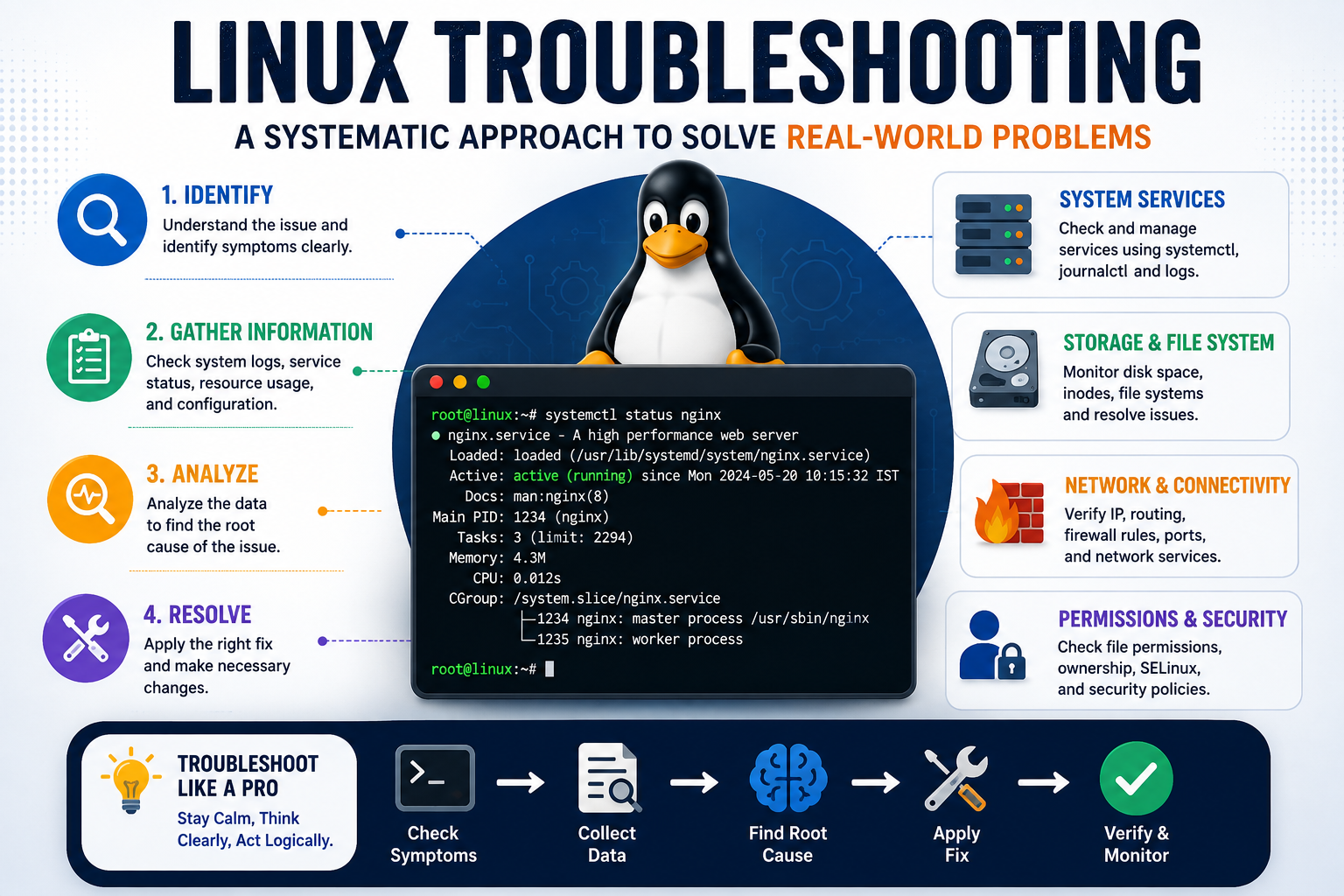
Scenario 2: The Server Is Running Slow Due to High CPU or Memory Usage
Questions related to performance issues are one of the most popular types of questions in Linux interviews due to practical problems. The example of the question is:
“The users complained about the slow response time of the application, although the server was working. How will you find the problem?”
The answer to the question should start from checking the general state of the system, instead of blaming any particular application. First of all, one needs to establish which kind of resources is used more: CPU, memory or I/O, or combination of these.
An experienced Linux engineer will be able to understand which processes consume the most resources and analyze their behavior – whether it is normal or unexpected. For example, the deployment of a new application, an infinite loop or background process can eat up system resources, affecting the work of all services on the server.
At the same time, it is necessary to understand the load on the system. High percentage of CPU usage does not always show a problem, like low CPU usage does not always mean that the server works well. Multiple metrics should be analyzed before making conclusions about the problem. Logs review, resource trends analysis and search of any recent changes in the configurations help to understand why the problem occurs.
Interviewees get additional points for explaining why the particular actions are performed instead of just naming commands. It shows that they think structurally and have understanding of Linux behavior under load.
The people who have done a linux course for beginners usually know basic monitoring commands, but interview success lies in interpreting the results of command execution.
Scenario 3: Users Cannot Access Files or Directories
The next set of issues that can be found during the Linux interview are permission issues. These are the common problems in real-life scenarios. An interview question on this topic might be something similar to this one:
“The user claims that he/she does not have access to the application directory even though all necessary files exist. What will you do to troubleshoot?”
Instead of making a conclusion that the files are lost right away, the best engineer first checks the ownership of the files, their permissions and the group assignment. Permission mechanism in Linux works in layers and hence the problem can occur due to wrong permissions, wrong permissions of the directories, lack of proper group assignment, and even the security policies.
The troubleshooting process involves the following steps:
- Ownership checking of files/directories.
- Permissions for reading, writing and executing.
- User and group membership.
- Checking the recent permission changes.
- Security policy checking if nothing else helps.
Sometimes the reason for the issue is something different from the permission problem. For instance, file system became read-only, storage is full or the account of the service user is outdated. It means that candidates possessing good troubleshooting skills take into consideration various possibilities.
Those people who learn Linux administration understand that fixing the permissions is not the only thing to do in order to solve the issue as they have to determine the reason for the problem first. In such a way the security of the system will be protected.
Scenario 4: Disk Space Is Suddenly Full
Storage-related problems represent another type of typical issues that appear during interviews because of how quickly they affect applications, databases, logging, and backup services. One of the most common issues mentioned by hiring managers during interviews relates to a server which became unusable because of full disks reaching 100% capacity.
The first step in such a situation would be finding out which filesystem is full without deleting any data. Having identified the problematic partition, the next step would be to find the directories which take up most of the space including log files, temp files, old backups, images of containers, application caches, and archived data.
It would be reasonable from a professional point of view to understand the reasons for the increased disk space usage rather than simply freeing some space. If the log files keep growing, then solving the problem is necessary rather than deleting the logs.
Another valuable skill which is liked by interviewers is talking about ways of preventing the issue and managing it beforehand. Such activities include:
- Log rotation.
- Monitoring of filesystem usage.
- Regular deletion of old backups.
- Storage usage alerts.
- Application logging.
This indicates that the candidate is thinking ahead about his job rather than repairing the problems after they occur. To achieve such skills, one must have some practical experience which can be gained in the best Linux course.
Scenario 5: The Server Is Reachable, but the Application Is Not
Also, an important aspect to consider in relation to the discussed topic is the ability to troubleshoot the problem in case such arises, which should be demonstrated by the candidate during the interview. It means that in general during the interview, the interviewer usually does not ask questions regarding the theoretical aspects of networking. However, what the interviewer does is to pose the following situation to the candidate:
“Users can ping the server, but they cannot access the web application. What will you do?”
In this respect, the correct approach to solving this problem requires consideration of the problem on the level of several layers. Considering that the user reaches the server, then it is likely that the problem does not lie in the network, but in the application, its incorrect configuration, firewall and the listening ports. A good specialist verifies whether the application listens the needed port and whether the configuration of the firewall is correct.
Furthermore, it is helpful to use the logs of the system and the application, as in most cases they indicate the permission problem, misconfiguration, missing components and problems with the application. Before performing any action, the specialists gather all the required information first.
Such explanation of the troubleshooting procedure is greatly appreciated by the interviewer as it is applied in practice.
Scenario 6: The System Fails to Boot Properly
However, boot problems are less common than those with services and storage and are still quite popular in interviews since they test your knowledge about the Linux operating system. The interviewer may explain that there was some problem related to booting after a change in configuration or installation of a new kernel, and then ask you what should be done in such a situation.
The first thing for an experienced system engineer in this case will be to determine at what point during booting did it fail. There could be various reasons for the failure – either due to configuration changes, corrupt file systems, problems with boot loader, wrong parameters of the kernel, and so on. Not only the resolution of the problem is important here but its detection – finding the reason for the failure by looking through the recent changes and logs.
And once it is done, you should analyze what caused the problem and make sure to take necessary preventive actions in order not to have the same failure again. Also, boot problems are another way to test the knowledge about Linux recovery processes and maintenance.
Why Linux Certifications Still Matter
However, the acquired practical knowledge is still the key component during technical interviews; besides, certifications help to confirm the applicant’s knowledge of Linux and enterprise practices. Moreover, certification shows the desire of the candidate to constantly learn something new, an attribute valued highly by employers in the fast-changing environment of technologies.
Among the most valuable certifications is the RHCSA certification, oriented on the application of skills in practice rather than just theoretical knowledge. The preparation to such certification will help to improve the level of understanding in user management, storage, network, system services, security, and troubleshooting. The exam being performance-based, it motivates candidates to acquire skills necessary for the enterprise practice.
Certifications will also be helpful for those professionals who are planning long-lasting career. Many people with years of experience in the field try to achieve the RedHat certified engineer status in order to improve their expertise in Linux administration and automation. While having only certificates is not enough to get hired, it can help to compete for the positions successfully.
Tips to Crack Linux Troubleshooting Interviews
Technical interviews become relatively simple if preparation concentrates on practical cases rather than command memory. It is expected from candidates to describe their thinking process, analyze potential reasons for the problem and explain why particular actions are performed in order to solve the problem.
Useful preparation techniques are as follows:
- Test troubleshooting skills in the virtual environment of Linux.
- Create small projects instead of theoretical knowledge.
- Be able to read and understand system logs.
- Know about the boot sequence and services of Linux.
- Solve old interview cases constantly.
- Explain the troubleshooting technique out loud.
Communication skill is not less important than technical one. It is common practice for interviewers to assess the logic of the problem investigation by candidates and their ability to stay calm in solving production-related problems.
Conclusion
In fact, Linux troubleshooting is about understanding how the system works rather than memorizing commands for all possible situations. Whether it is a problem with services, permissions, disk usage or other issues such as network problems or boot failure, each situation that requires troubleshooting will be useful for acquiring the practical skills that companies are looking for in their employees.
As businesses keep implementing cloud solutions, Linux continues to become the basis for any kind of servers, containers, and other IT infrastructures. Improving your troubleshooting skills and obtaining relevant certification may make a great difference both in interviews and when working with production systems.
When you see yourself in cloud or automation engineering in the future, it makes sense to combine your knowledge of Linux with the DevOps engineer certification in order to learn CI/CD and infrastructure automation as well as cloud concepts.
Common Mistakes Candidates Make During Linux Troubleshooting Interviews
Even the candidates who have an excellent knowledge of Linux find it difficult to perform well in the interviews as they concentrate only on providing the “correct command” rather than describing the entire process of solving the problem. The interviewers usually like to know the way in which a problem is solved and not just the solution.
Some of the major mistakes are:
- Reaching to conclusions based on partial information.
- Changing configurations before finding the real cause of the problem.
- Not paying any attention to system/application logs.
- Concentrating on just one cause of the problem.
- Using commands without knowing the actual meaning.
- Not describing the reason for doing a certain task during troubleshooting.
By avoiding the above mentioned mistakes, one will be able to give a good performance in the interviews. It should always be ensured that the whole process of troubleshooting is described in a logical manner.
How to Build Real Troubleshooting Experience
Preparation for an interview is much more efficient when it is done in combination with actual experience. Rather than just studying interview questions, set up your own lab environment with virtual machines and cloud-based environments to intentionally break something and then repair it.
For instance, one can:
- Halt necessary services and bring them back online.
- Overload the filesystem and fix it.
- Cause permission conflicts and sort them out.
- Break network connection.
- Study logs after configurations have been made.
- Observe CPU, RAM, and disk usage.
This will help you build your self-confidence and learn to approach the situation the way Linux system administrator does.
Final Thoughts
Troubleshooting of Linux is one of the most important skills that any individual must learn if they are planning to build their careers in the areas of system administration, cloud computing, or DevOps. Technical interviews have now shifted toward practical examples since employers expect engineers who can understand the issues and solve them logically to ensure that the services are back up and running.
Learning how to troubleshoot Linux is not a very difficult task since there are two simple ways to master it. These involve learning the basics of Linux along with the regular practice of the same. Grras Solutions offers practical Linux courses that can enhance your skills in the area through lab-based scenarios and expert mentoring.





 Whatsapp us
 Call us
 Enquire Now