Linux forms the core of today’s IT infrastructure, including servers, cloud systems, and even DevOps and container technologies. Since companies use Linux extensively for business-critical processes, the employees required by the company should be able to do much more than execute commands — they must be capable of diagnosing issues, identifying their cause and fixing them as soon as possible. That is why, Linux troubleshooting became one of the most essential skills evaluated in an interview when applying for RHCSA, RHCE or EX342 certifications.
Unlike theory-based interviews, Linux administration interviews assume real-life situations. Instead of asking about the function of some command, interviewers tend to describe a situation that may arise in a production environment and evaluate your ability to troubleshoot using a logical sequence of steps. They evaluate how well you analyze the problem, collect information, exclude various factors and finally find a proper solution. An approach-oriented method often makes a bigger impression on interviewers than a huge number of memorized commands.
For students training for RHCSA training online, it is useful to practice in production-like situations. It not only helps to prepare better for an exam but also gives experience in performing the duties of a Linux administrator.
Why Troubleshooting Skills Matter More Than Memorizing Commands
All Linux administrators will face unforeseen challenges. The server does not boot after an upgrade, the workers are unable to access some application, no free space is left on the disk overnight, or some vital service becomes non-operational during office hours. Under such circumstances, companies need people who can remain cool-headed, determine the problem, and solve it without bringing any further troubles.
This is precisely what the interviewers want. They do not only care about how many Linux commands the applicant knows. What is of much greater importance is the problem-solving strategy that the candidate utilizes. A good Linux administrator gathers all necessary information prior to doing anything else, validates his/her conclusions by analyzing the logs of the system, and makes sure that the problem has been solved. These are exactly the same skills required in linux troubleshooting red hat ex342.
Usually, the troubleshooting process includes the following steps:
- Problem description
- Information gathering from logs and monitoring systems
- Forming a theory about the possible cause of the issue
- Implementing solutions one by one
- Ensuring that all services are running properly
- Recording the results for future reference
These skills cannot be acquired through theoretical study alone. They require hands-on practice in real or virtual environments where you can intentionally break configurations and restore services. This practical approach builds the confidence and experience needed to handle production issues effectively, making it one of the best ways to learn Red Hat Linux.
Boot Failure and System Recovery Interview Questions
The typical scenario during an interview on the subject of Linux boot process usually concerns the inability of a server to boot after some maintenance actions or an unplanned reboot due to the high importance of proper boot process. Since failure to start can seriously affect company’s activities, the interviewer asks such questions to test candidates’ knowledge of boot process in the Linux OS.
Example of such questions is:
“A production server doesn’t boot properly after kernel update. What would you do in order to troubleshoot it?”
Instead of giving immediately an answer, first you have to state that you need to establish at which point the problem appears – bootloader, kernel, filesystems or hardware.
Recovery actions can include:
- Check if the GRUB menu works correctly
• Boot the server using Rescue or Emergency Mode.
• Check if there were any recently made configuration changes.
• Look through filesystem check results
• Check /etc/fstab file for possible problems
• Examine the boot logs for possible errors
• If needed restore previous working kernel
The best way to answer the question is to state not only command, but its meaning and reasons to use it.
Reasons Behind Boot Failure
There can be several reasons for Linux machine to fail starting:
- Badly configured bootloader
• Wrong filesystem configuration
• Failure of OS update procedure
• Lack of storage devices
• Root partition fullness
• Broken kernel packages
Each reason can significantly affect the boot process.
Storage and Filesystem Troubleshooting
Storage Management
This is one of the topics that usually come up in Linux interviews since nearly every system runs into problems related to either disk space or filesystems in production. It is an important aspect to troubleshoot when applications, databases, and even log services need access to functional storage.
The interviewer can ask:
“What are the steps you will take in case your application fails to operate because of the full root partition?”
An experienced professional starts by figuring out what takes up storage instead of starting to delete files. The goal here is to find the real source of the problem and avoid accidentally losing data.
Usually, an investigation will include:
- Determining which filesystem has issues.
• Determining the state of the disk usage.
• Identifying directories with high usage of space.
• Going through application logs.
• Looking into temporary files.
• Checking backup files.
• Looking for package cache usage.
Common Issues Related to Disk Space
Among the most common causes there are:
- Large log files
• Old backups
• Never deleted temporary files
• Core dump files
• Package cache usage
• Image files of containers
Large enterprises do not set up servers by hand since it is not easy to maintain consistency between hundreds of systems manually. Tools for automatic deployment like kickstart RedHat solve this problem. Candidates who know about this approach will have an easier time answering enterprise-related interview questions.
File Permission and User Access Issues
Permission issues are among the easiest cases to simulate in the interviewing setting since they happen rather often in production environments. For instance, applications can stop accessing some files, users get “Permission Denied” errors or scripts stop working after configuration changes.
Here is a typical interview question on permission problems:
“A user can log into the server but can’t access an application directory. How would you troubleshoot this problem?”
To begin with, a good answer will not involve any assumptions about the application being broken. First, an interviewee needs to investigate if the problem lies in the file ownership, directory permissions, user’s membership in groups, etc.
The most logical investigation steps include:
- Checking the file ownership
• Checking the directory permissions
• Checking the user groups
• Checking the Access Control Lists (ACL)
• Checking mounted filesystem permissions
• Checking security contexts
This knowledge shows how one understands how Linux permissions work in combination with authentication and security policies.
Network and SSH Troubleshooting Questions
Problems with networks are some of the most common cases in which enterprise Linux administrators encounter challenges in their work. Despite all the services on a server being working fine, users cannot access any applications or services without proper network connection. That is why it is rather common for an interviewer to ask questions related to networking situations.
Here is a typical interview question on networking problems:
“After a scheduled maintenance window, users can’t connect to a Linux server via SSH anymore. What would you check first?”
One should understand that to properly solve this problem, one needs to approach it in a methodical way and not just assume that there is something wrong with SSH. First, one needs to make sure that the server is even available over the network.
If the server answers to the requests, then one will need to investigate what exactly causes the problem – is it a SSH service or some firewall rules, DNS resolution, or authentication that breaks the process?
Typically, one needs to check:
- Whether the server is available over the network
• Whether the SSH service is running
• Firewall rules and allowed ports
• SSH configuration files
• DNS resolution if the server is addressed by hostname
• Authentication logs for possible attempts to log in
In addition, it is always good to explain why one checks certain things and not other – this shows an interviewee’s logical reasoning skills. And those are necessary for an enterprise Linux administrator.
Professionals getting ready for RHCE certification should know how to troubleshoot networking services since the enterprise Linux environment relies greatly on remote administration and networking services.
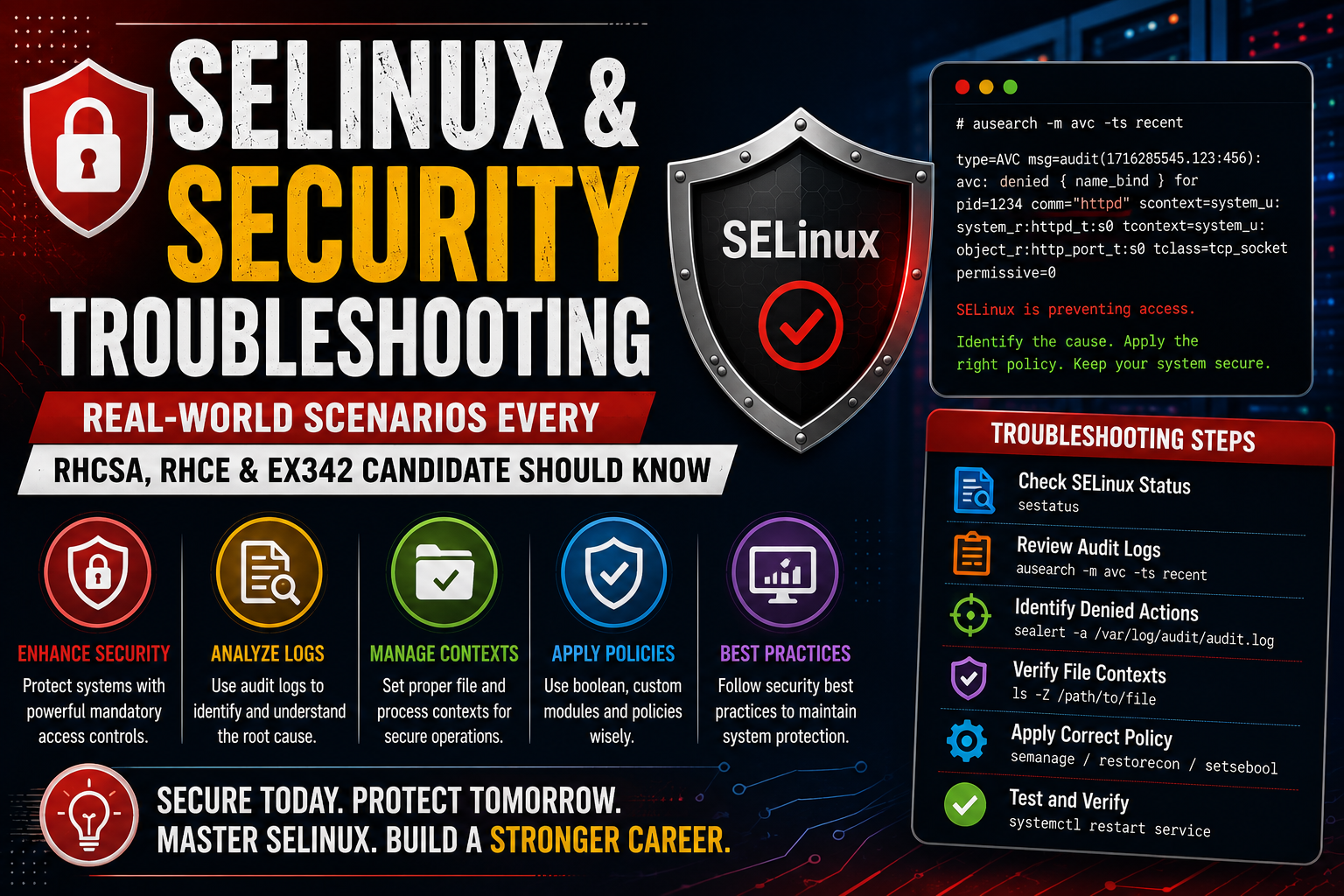
SELinux and Security Troubleshooting
However, when managing the Linux operating system, its security must be assured and the best option for doing this is by using SELinux because it is the safest choice. Nevertheless, it is one of the least known subjects in interviews. Beginners usually try to turn off SELinux in case there are any issues, however, it should be the last step taken.
Example of the interview question may be: “The web application stops working in case the SELinux is enabled. How will you resolve the issue?”
The answer of the applicant may include that he should assure that the application will work well despite SELinux being enabled. This means that the applicant will have to review logs and denied actions.
Some of the steps that help to solve the problem are:
- Know the mode in which SELinux runs
• Audit logs review
• Find denied actions
• Make sure that contexts of your file or directory are correct
• Restore default security contexts, if necessary
• Apply SELinux policy
• Re-test the system
The employer likes those applicants who are able to manage the system properly because the applications will run on production servers. Being RedHat Certified Engineer shows good knowledge in Linux administration.
Performance and Resource Utilization Scenarios
These performance issues become another frequently used topic when conducting interviews since it implies an ability of administrators to dig deeper into the overall condition of the system. Slowness can occur because of such issues as high CPU usage, memory leaks, storage problems, or badly written applications. Administrators are expected to investigate the system first before offering any solutions to them.
One of the questions that may be asked during the interview is the following one:
“Users complain about slowness of the server during working hours. How do you investigate it?”
A good answer to this question begins with the analysis of the system performance statistics. Before restarting the services right away, an administrator is expected to find out what the reason for the slowness is.
It typically involves the following:
- Analysis of CPU-intensive processes.
• Analysis of memory utilization.
• Analysis of swap activity.
• Analysis of disk input/output operations.
• Analysis of active services.
• Analysis of scheduled jobs.
• Analysis of application logs.
• Comparison of the system performance statistics with the historical ones.
Since Linux becomes increasingly popular for artificial intelligence and data-driven infrastructure, many administrators find themselves working on the red hat machine learning platform. It is quite important because of the computing resource demands AI workloads put on the servers.
Container and Automation Interview Questions
Contemporary Linux administrators very seldomly operate standalone systems. Today, applications are mostly deployed using containers, orchestration engines, and automatic provisioning technologies. This makes technical interviews to become more focused on questions, which are related to the integration of classic Linux system administration with modern cloud-native concepts.
One of the most common scenarios is:
“A containerized application launches successfully, yet users cannot use the application. What will you do to troubleshoot this problem?”
A correct answer would be that, at first, you will check whether the container launches successfully, before examining network, volumes, application configuration, and exposed ports. Container logs might provide useful information regarding failed container startup or misconfiguration.
Things that can be checked include:
- Health state of the container.
• Application logs.
• Network connections.
• Mounted volumes.
• Environment variables.
• Limits of resources.
• Image compatibility.
• Configuration files.
An understanding of the OpenShift containerization will help Linux professionals deal with enterprise-level OpenShift containerization better since many troubleshooting concepts are based on Linux networking, storage administration, permissions management, etc.
Preparing for Linux Troubleshooting Interviews
Technical interview does not test just technical skills, but also communications skills, logic, and pressure resistance. Even the most skilled administrators may get low scores by giving orders without explaining the reason for them.
To get a good result at the interview, you need to:
- Analyze the whole situation before answering.
• Ask questions in case something crucial is missing in the description.
• Explain how you are solving the problem.
• Present evidence based on system logs.
• Refrain from unnecessary changes in system settings.
• Ensure the problem is solved properly.
• Give recommendations to reduce chances of similar problems in the future.
One of the preparation techniques for the interview is making your own Linux lab with the use of virtual machines. This way, you will be able to practice solving the server failure and rebuilding it.
Career Opportunities After Linux Certification
Knowledge about Linux is one of the best technical skills in the IT sphere. Businesses that operate in the financial sector, the healthcare industry, cloud computing, telecom, cyber security, and software development need professionals with an effective methodology for handling Linux systems.
The positions that can be found by your Linux administration skills are as follows:
- Linux Systems Administrator
• Linux Support Engineer
• DevOps Engineer
• Cloud Infrastructure Engineer
• Site Reliability Engineer (SRE)
• Platform Engineer
• Automation Engineer
• Infrastructure Consultant
Professionals who combine Linux administration skills with cloud and containers technology will have more job opportunities and earn more money.
Conclusion
Troubleshooting in Linux goes beyond merely knowing terminal commands; it requires an understanding of the underlying workings of the system and applying systematic thinking in solving actual production problems. Regardless of whether you are preparing for RHCSA, RHCE, or EX342 interviews, your problem-solving capabilities, log analysis, and capability of finding the root cause and restoring services in time will be assessed by potential employers.
The best way to gain such experience is through laboratory work and problem-solving exercises in real-life-like situations. As businesses continue shifting toward cloud-native infrastructure and Kubernetes-based systems, getting a red hat OpenShift certification and solid Linux troubleshooting skills might become very beneficial for you professionally.





 Whatsapp us
 Call us
 Enquire Now