Java is a programming language used to create software, websites, mobile applications, and many other systems. It was developed in 1995 and is still widely used today.
Java is known for being simple, secure, and powerful. One of its main ideas is:
“Write Once, Run Anywhere”
This means you can write Java code on one computer and run it on any other computer without changing it.
1. What is Programming?
Programming means giving instructions to a computer so it can perform tasks.
Examples:
- Adding numbers
- Displaying messages
- Creating applications
Java is one of the languages used to write these instructions.
2. How Java Works
Java works in multiple steps:
- You write code in a
.javafile - A compiler converts the code into bytecode
- The Java Virtual Machine (JVM) runs the bytecode
Important Terms:
- Compiler: Converts human-readable code into machine form
- Bytecode: Intermediate code generated after compilation
- JVM: Executes the program
The JVM allows Java to run on different systems.
3. Basic Structure of a Java Program
public class HelloWorld {
    public static void main(String[] args) {
        System.out.println("Hello, World!");
    }
}
Explanation:
class: A container that holds codemain(): The starting point of the programSystem.out.println(): Displays output
4. Object-Oriented Programming (OOP)
Java is based on Object-Oriented Programming. This means it uses objects and classes.\
- Class: A class is like a blueprint.
- Example:
- Class: Design of a car
- Object: Actual car
- Example:
- Object: An object is an instance of a class.
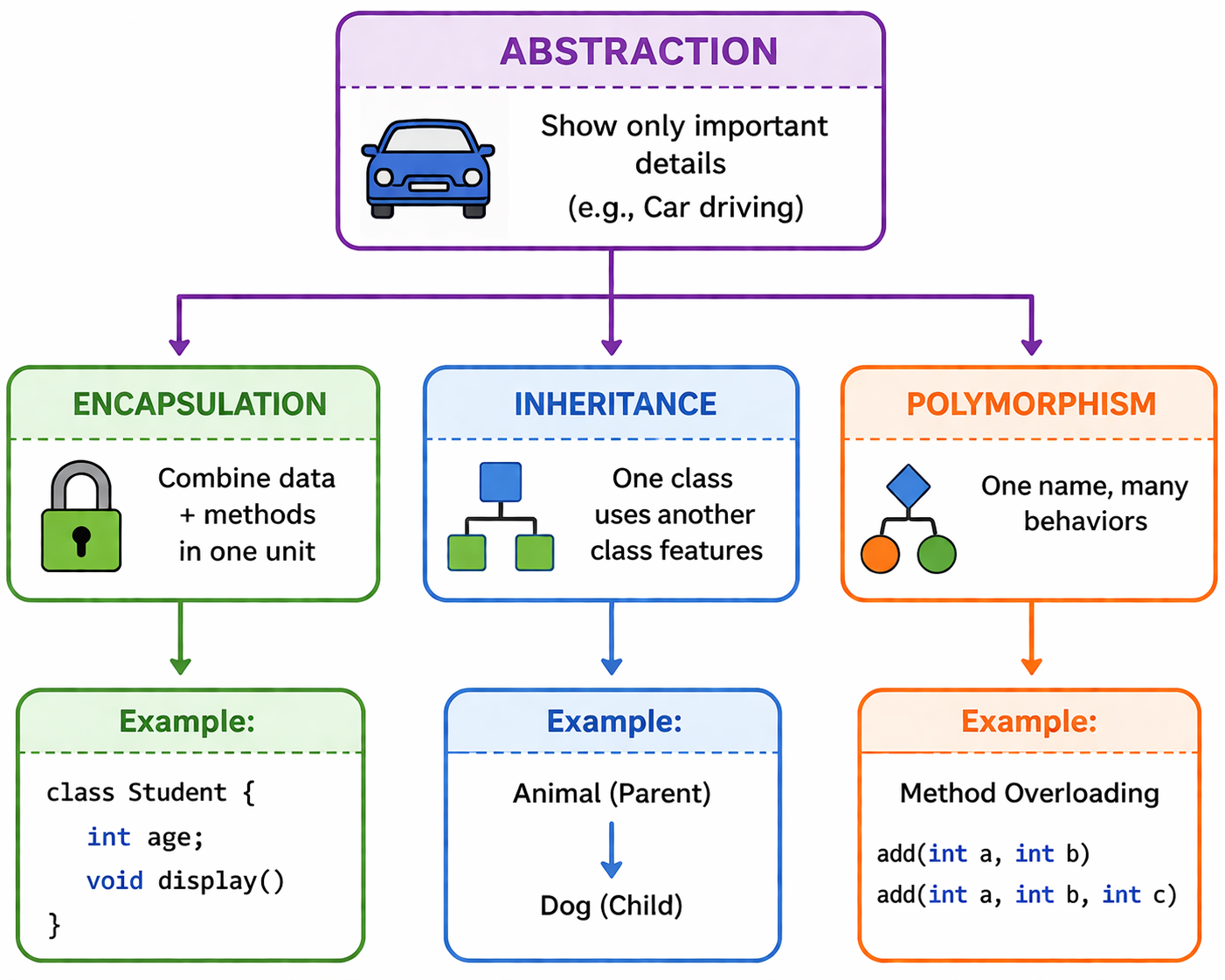
5. Four Main OOP Concepts
6. Data Types in Java
Data types define the type of data a variable can store.
Examples:
int: Stores integersfloat: Stores decimal numberschar: Stores a single characterboolean: Stores true or false
7.Variables
A variable is used to store data.
Example:
int age = 20;
int: Data typeage: Variable name20: Value
8. Control Statements
Control statements manage the flow of a program.
- If Statement
if (age > 18) {
    System.out.println("Adult");
}
- Loop (Repetition)
for(int i = 0; i < 5; i++) {
    System.out.println(i);
}9.Platform Independence
Java is platform-independent because it uses the JVM.
- Code is converted to bytecode
- JVM runs bytecode on any system
This allows the same program to run on Windows, Linux, or macOS.
10.Memory Management (Theory)
Java manages memory automatically.
Types of Memory:
- Stack Memory: Stores temporary data
- Heap Memory: Stores objects
Java uses Garbage Collection to remove unused objects.
11. Exception Handling
Exception handling is used to manage errors.
Example:
try {
    int a = 10 / 0;
} catch(Exception e) {
    System.out.println("Error occurred");
}
This prevents the program from crashing.
12. Multithreading
Java allows multiple tasks to run at the same time.
Example:
- Running a program while downloading a file
13. Applications of Java
Java is used in:
- Mobile applications (Android)
- Web development
- Banking systems
- Desktop software
- Enterprise applications
14. Advantages of Java
- Easy to learn
- Secure
- Platform-independent
- Large community support
15. Disadvantages of Java
- Slower than some low-level languages
- Uses more memory
- Requires more code
16. Tips for Beginners
- Learn basic concepts clearly
- Practice regularly
- Build small projects
- Focus on OOP concepts
- Be consistent in learning
FAQs About Java Programming
1. What is Java programming used for?
Java programming is used to develop web applications, Android apps, desktop software, enterprise systems, cloud applications, and banking software. It is widely used because of its security, scalability, and platform independence.
2. Is Java good for beginners?
Yes, Java is considered beginner-friendly because it has simple syntax, strong community support, and teaches important programming concepts like OOP, variables, loops, and classes.
3. What is the meaning of “Write Once, Run Anywhere” in Java?
“Write Once, Run Anywhere” means Java code can run on different operating systems without changing the program because Java uses the JVM (Java Virtual Machine).
4. What are the main concepts of Object-Oriented Programming in Java?
The four main OOP concepts in Java are Inheritance, Encapsulation, Polymorphism, and Abstraction. These concepts help developers write reusable and organized code.
5. What is the difference between JDK, JRE, and JVM?
JDK is used for developing Java programs, JRE helps run Java applications, and JVM executes Java bytecode on different platforms. Together, they make Java development and execution possible.
6. What can I do after learning Java?
After learning Java, you can become a Java Developer, Backend Developer, Android Developer, Software Engineer, or Full Stack Developer. Java skills are highly valuable in the IT industry.
17. Conclusion
Java is a strong and reliable programming language. It is suitable for beginners as well as professionals.
By learning Java, you can build applications, software, and systems used in real-world industries. The key is to understand the basics and practice regularly.




 Whatsapp us
 Call us
 Enquire Now